Daily System Check Automation
The Challenge
Overnight system updates would occasionally disrupt computer audio settings, causing sound failures that often went unnoticed until the start of a live meeting.
This created several recurring problems:
Delayed meeting starts
Unplanned system reboots
Disrupted communication
Lost productivity during troubleshooting
Frustration caused by repeated technical interruptions
A simple and proactive method was needed to verify audio functionality before daily meetings began.
The Solution
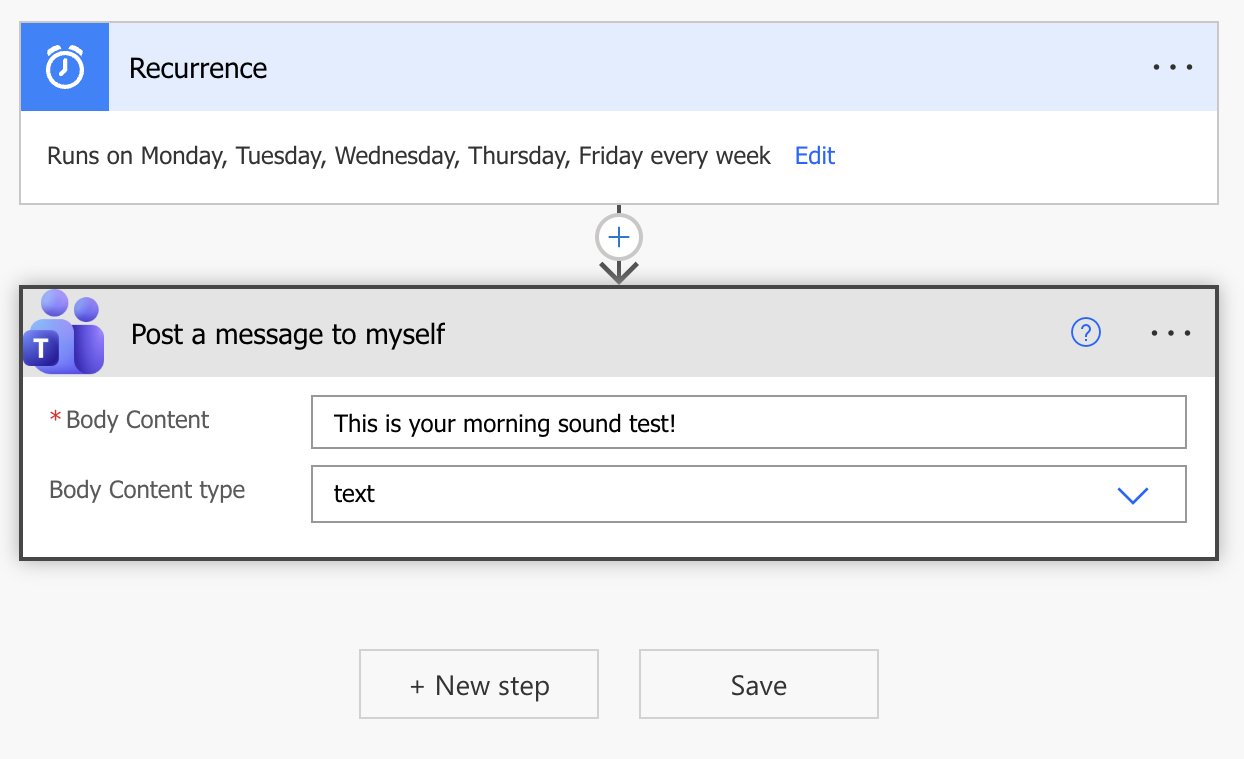
A recurring Power Automate workflow was developed to send an automated sound test notification through Microsoft Teams at the beginning of each workday.
The workflow:
Runs automatically each workday morning
Sends a Teams notification with an audio alert
Provides immediate confirmation that system sound is functioning correctly
Allows issues to be identified and resolved before scheduled meetings begin
If the notification sound is heard, the system is working properly. If no sound is heard, the computer can be rebooted proactively before impacting meetings or collaboration.
Key Features
Automated daily scheduling
Microsoft Teams notification integration
Proactive system functionality check
Early issue detection
Reduced meeting disruptions
Lightweight and low-maintenance workflow
Fully automated recurring execution
Business Impact
Although simple, the workflow eliminated a recurring operational annoyance and reduced the likelihood of meeting interruptions caused by unnoticed audio failures.
Key improvements included:
Reduced meeting delays
Faster identification of technical issues
Improved reliability of daily communication tools
Reduced frustration and troubleshooting during meetings
Increased productivity through proactive issue detection
The solution demonstrates how small automations can create meaningful improvements in day-to-day operational efficiency.
Tools Used
Microsoft Power Automate
Microsoft Teams
Workflow Automation